


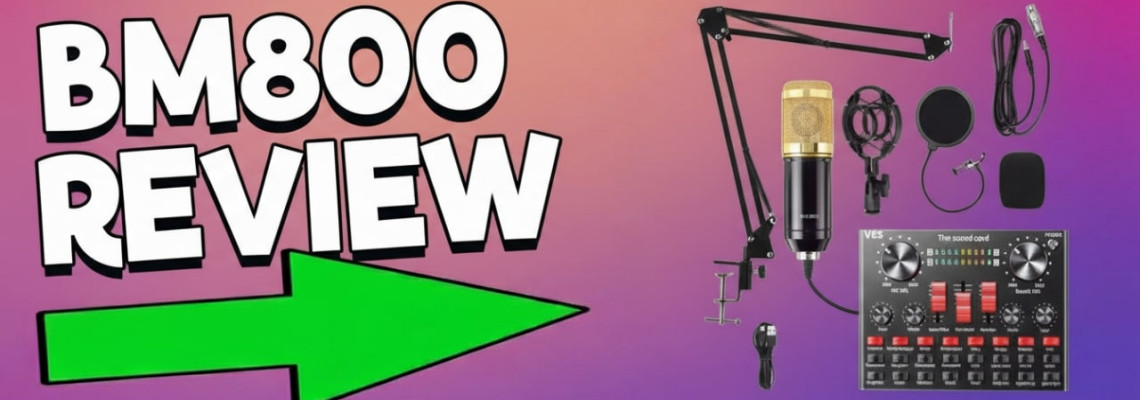
BM800 microphone review: For budget-minded creators and podcast hosts, this budget condenser mic often appears as a go-to choice. We at Geonline put the BM800 through thorough tests to see if it lives up to the hype. In this review, we’ll cover its sound quality, setup, noise performance, and how it compares to other inexpensive mics. Finally, we’ll offer real-world usage tips and recommend alternatives if the BM800 doesn’t quite fit your needs.
What is the BM800 Microphone?
The BM800 is a popular budget-friendly condenser microphone often sold in recording starter kits. It features a cardioid pickup pattern, which means it mostly captures sound from the front and reduces noise from behind. These mics usually connect via an XLR plug and require power (typically phantom power) to run properly.
A basic BM800 kit includes the mic, a desk stand or scissor arm, and a shock mount. Many kits also add a pop filter, cable, and even a simple USB sound card for connection. All of this is offered at a very low price. Many beginners view the BM800 as a go-to option for podcasting, YouTube, and home recording.
Key features of the BM800:
Type: XLR condenser microphone with cardioid pattern
Frequency Response: ~20 Hz – 20 kHz (varies by manufacturer)
Sensitivity: High (good for soft sounds, but can pick up noise)
Power: Requires 48V phantom power (or a powered USB adapter)
Kit includes: Shock mount, pop filter, table stand, foam cap (quality varies)
BM800 Sound Quality and Performance
The BM800 produces a fairly clean sound in the midrange, which is great for vocals and podcasts. It handles voice frequencies well, but it usually lacks deep bass and crisp high-end clarity compared to pricier mics. In practice, recordings with the BM800 may sound a bit flat or muffled without EQ. Its high sensitivity also means it will pick up background noise and room echoes if the recording space is not well-treated. Many users report some static hiss or rumble, especially if the gain is turned up. That said, for a cheap condenser, the BM800 delivers surprisingly good clarity on speech, making it a decent entry-level choice.
Clear midrange: Good for spoken word (dialogue, narration)
Limited bass: Lower frequencies are not as strong or deep
Noise floor: Can introduce hiss and background noise, especially in untreated rooms
EQ helps: Many users find simple equalization (boosting bass, cutting highs) improves the tone
Voice performance: Satisfying for podcast and voice-over when set up properly
BM800 Setup and Phantom Power
To power the BM800, you typically need to use phantom power. The BM800 is an XLR condenser mic, not a USB plug-and-play. It requires an audio interface or mixer that supplies 48V DC. Without phantom power, the mic will be extremely quiet and noisy. We found that connecting the BM800 with an XLR cable to a 48V-capable interface produced a strong signal. In contrast, the cheap USB sound card included in some kits provides only about 5V. We found this left the mic underpowered, with weak output and extra noise. Therefore, for clear sound, always use a true phantom power source.
Setup tips: Attach the BM800 to a desk stand or boom arm using its included shock mount. This isolates the mic from handling noise. Use a pop filter to tame plosives. Position the mic about 6–12 inches from the speaker or singer, pointing at the sound source. The BM800’s cardioid pickup pattern means it hears sounds mostly from the front. Also, record in a quiet room or use acoustic panels to minimize echo. Be sure to enable 48V phantom power and set the input gain moderately. If your interface has a high-pass filter, try using it to cut low-frequency rumble.
Tech tip: The BM800 is a condenser microphone. For details on how condenser mics work and phantom power, see Wikipedia’s Condenser microphone and Phantom power (audio) pages. Using a proper audio interface (with 48V) will ensure the BM800 reaches its potential.
Using the BM800 for YouTube and Podcasting
Many beginners use the BM800 for YouTube videos, streaming, and podcasting. Its clear capture of midrange frequencies makes voices sound natural, ideal for talking-head content. We found it can greatly improve audio over a built-in webcam or phone mic. Also, using the BM800 with a pop filter and basic EQ can yield professional-sounding dialogue. However, as a budget mic it still has noise and limited bass, so it’s best for speech rather than music. In our podcast test, the host’s voice came through clearly. However, faint room echo was noticeable without a quiet environment. Overall, the BM800 is a solid choice for voice-based content if your setup is optimized and noise is minimized.
Podcasting/Streaming: Good voice clarity makes it popular for blogs and shows.
YouTube Videos: Outperforms built-in camera mics; dialogue sounds more polished.
Gaming/Voice Chat: Works well for clear voice chat if connected via an audio interface.
Not for instruments: Its tone and sensitivity are geared toward vocals; not ideal for recording music.
BM800 vs Other Budget Mics
Comparing the BM800 to other budget microphones depends on what you need. The Audio-Technica AT2020 is a popular alternative, but it costs many times more – it provides cleaner sound and better build quality. The BM800 can’t match that, but for many it offers acceptable quality at a fraction of the price. USB mics like the Blue Snowball or Fifine K669B are simple plug-and-play and capture decent audio for their price, though they have fixed patterns and lower sensitivity. Dynamic mics such as the Samson Q2U or ATR2100 come with built-in audio output and noise rejection, making them good for live speech. Ultimately, the BM800 holds its own among entry-level mics. Its main advantage over others is price and XLR connectivity, but better-known models generally sound cleaner.
AT2020 vs BM800: AT2020 (~$100) offers much higher fidelity. BM800 is ~$20 with lower-end sound.
USB mics: Blue Snowball, Yeti, Fifine USB – easy setup but often cost more. They skip phantom power since they draw USB power.
Dynamic options: Samson Q2U, ATR2100 – rugged mics with XLR/USB; quieter background noise but less sensitivity.
Lavalier alternative: Boya BY-M1 – a $15 lapel mic that’s convenient but best for single speakers.
Clones: Neewer NW-800, Tonor/MAONO kits – very similar in spec and often same OEM as BM800.
For complete beginners, some choose a USB microphone instead (no interface needed). However, the BM800’s XLR design gives it an edge if you have an interface: you can upgrade your audio gear over time. As [Geonline’s audio guides] we suggest, budget mics are stepping stones. They’re great for learning, but as you progress, upgrading can pay off in sound quality.
BM800 Pros and Cons
Pros: Very affordable; decent vocal clarity with proper EQ; metal body is sturdy; cardioid pattern focuses on voice; kit includes stand, shock mount, pop filter.
Cons: Requires phantom power and audio interface; noticeable self-noise and hiss; limited bass response; USB adapter/kit parts are low quality; performance can vary between units.
In short, the BM800 offers exceptional value for beginners, but it comes with trade-offs. It’s a budget mic – so while it can improve your audio over a basic webcam or headset, it won’t match high-end studio microphones.
BM800 Alternatives
If you’re considering something different, check out these alternatives:
Fifine K669B: A plug-and-play USB condenser mic (no phantom power). It’s similarly priced and easy to use.
Samson Q2U: A dynamic microphone with both XLR and USB outputs. Slightly higher price ($60–$70) but versatile and less hiss.
Audio-Technica AT2020: Higher-end XLR condenser ($100+). Much better sound if you’re ready to invest more.
Blue Snowball iCE: A $50 USB desktop mic. Good voice quality and simple setup, but at double the BM800’s price.
MXL 990: Entry-level XLR condenser (~$70). Better bass and build than BM800, but still affordable.
Neewer NW-800: Another ultra-cheap condenser (15) very similar to BM800; quality is hit-or-miss.
Boya BY-M1: A lapel mic with 3.5mm plug. Not a studio mic, but popular for mobile podcasting and video.
Each alternative has its own pros (ease of use, sound profile, etc.). The BM800 stands out mainly for its low cost and XLR design. Pick based on whether you need simplicity (USB mics) or flexibility (XLR mics).
Frequently Asked Questions
What is the BM800 microphone?
The BM800 is a popular budget condenser microphone known for its affordability. It’s commonly used by beginners for home studios, streaming, and podcasting. The mic often comes in a starter kit (stand, pop filter, etc.), making it an all-in-one option for new content creators.
Does the BM800 require phantom power to work?
Yes. The BM800 is an XLR condenser mic, so it needs 48V phantom power from an audio interface or mixer. Without phantom power, it will produce a very weak and noisy signal. In practice, the mic sounded normal only when connected to a device supplying 48V.
Can I use the BM800 for podcasting and YouTube?
Absolutely. The BM800 is often used for podcasting and YouTube videos on a tight budget. Its clear midrange makes voices sound natural, which is ideal for speech. With a good setup (pop filter, quiet room, basic EQ), it can deliver satisfying voice quality for streaming or narration.
How is the recording quality of the BM800?
For the price, the BM800’s recording quality is decent. It captures clear vocals, though it lacks deep bass and can introduce some hiss. We found that adding a bit of EQ (boosting low end, cutting harsh highs) makes a big difference. It works well for basic home recording, but it won’t match a professional studio mic.
What are the pros and cons of the BM800 microphone?
Pros: It’s very affordable, with good voice clarity after EQ, and includes accessories in the kit. Cons: It needs phantom power and an interface, and it can be noisy with limited bass. In our tests, we saw that it’s great for beginners but has trade-offs compared to higher-end mics.
What are some good alternatives to the BM800?
Alternatives: Popular choices include the Fifine K669B (USB condenser mic), Samson Q2U (XLR/USB dynamic mic), and Audio-Technica AT2020 (higher-end XLR condenser). These mics are in a similar or slightly higher price range and may offer better noise performance, ease of use, or audio quality.
How do I set up the BM800 for the best performance?
Setup: Mount the BM800 on a stand using its shock mount and attach a pop filter. Connect it via XLR to an interface or mixer with 48V phantom power. Position the mic a few inches from your mouth and speak directly into the front. Use a quiet room or simple acoustic panels to minimize echo. Set the gain to a moderate level – too high gain will amplify hiss. In our experience, this setup yields the clearest sound from the BM800.
Final Thoughts
In our hands-on testing, the BM800 proved to be a dependable starting mic for beginners on a budget. At Geonline, we believe it’s a practical choice if you need basic recording gear without spending much. It’s cheap enough that you won’t fear experimenting, and our team noticed that even simple EQ tweaks and a good interface made its recordings quite usable.
7 Comment(s)
1
1
1
1
1
1
1
1
1
1
1
1
1
1
1
1
1
1
1
1
Leave a Comment